Scan visiting cards on WhatsApp: what to do with the cards you collect
Send a card photo in a chat, get the contact back as fields, attach a voice note with the booth context, and approve the follow-up before it is sent.
To scan a visiting card on WhatsApp you send a photo of the card to an AI agent in a normal chat. The agent reads the name, company, numbers and email, files the contact under the event where you met, and drafts a follow-up for you to approve. Nothing to install, nothing to type.
The point is not the scan. It is that the context of the conversation survives the walk back to the hotel.
Key takeaways
- Send the card photo in a chat you already use. Nothing to install.
- A voice note attached to the card keeps the booth context alive.
- Indian cards with two numbers and mixed scripts are the real test.
- Follow-ups are drafted for you to approve before anything is sent.
- Opt-in rules apply. WhatsApp requires permission before you message someone.
What this actually looks like
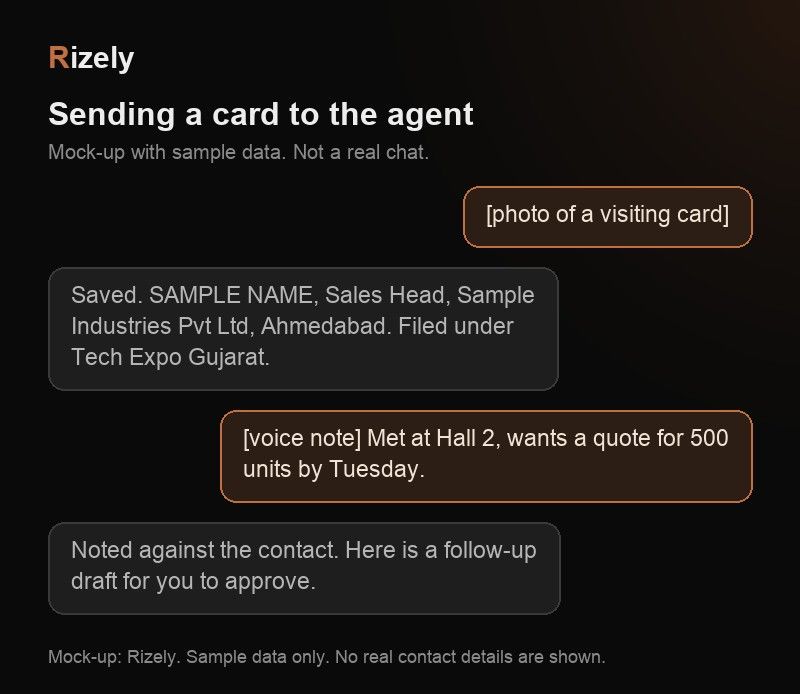
You photograph the card inside the chat window and send it. Seconds later the contact comes back as structured fields: name, designation, company, numbers, email, city. You reply with a voice note saying what the person asked for, and that note is attached to the same contact. By the evening the whole set exports to a sheet.
| What you send | What comes back |
|---|---|
| One card photo | Name, designation, company, numbers, email, city, filed under the event |
| A stack of up to six cards in one frame | Each card as a separate contact |
| An event badge QR code | The contact the badge encodes |
| A voice note after the card | Your booth context attached to that contact |
| Nothing more | A follow-up draft, waiting for your approval |
Batch photos mean a stack of six cards laid out on the table goes in one frame rather than six. Event badge QR codes work the same way. The mock-up above uses sample data. We never publish a real customer's card.
The 48 hours that decide whether a lead survives
The failure at an exhibition is rarely the extraction. It is the memory. On Friday you promised somebody a quote for 500 units by Tuesday. By Monday morning you have a card with a name on it and no idea which of four conversations it belonged to.
Attaching a voice note at the moment of the handshake fixes that, because you are recording context while you still have it. "Met at Hall 2, needs corrugated boxes, decision by month end" takes eleven seconds to say and it is the difference between a follow-up that lands and a generic message that gets ignored.
Step by step at the stall
- Take the card and look at it. Confirm the spelling of the name while the person is in front of you.
- Photograph it in the chat. Flat on the table, in whatever light the hall gives you. Both sides if the back carries a second number.
- Send a voice note. Say where you met, what they asked for, and when they need it.
- Check the read. Glance at the fields that came back. Fix anything the camera got wrong while the person is still standing there.
- Move on. The whole loop runs about fifteen seconds and it stays inside a chat window.
The discipline that matters is doing it at the table rather than in your pocket. A card that goes into a jacket at 11 am joins forty others by 6 pm, and the context is already gone.
Why Indian cards break ordinary scanners
Three things defeat most imported card scanners. Indian cards carry two mobile numbers on the same card, often a calling number and a separate WhatsApp number, and a scanner that expects one phone field merges them into something unusable. Many cards mix scripts, with a company name in Devanagari and an email in Latin on the same face. And the brand on the logo frequently differs from the legal entity on the GST bill.
Rizely's agent reads English plus Hindi, Gujarati, Marathi, Tamil, Telugu, Bengali, Kannada and Malayalam, including cards that mix scripts and carry dual numbers. The honest limit is that a photo of a glossy card under a hall spotlight is still a photo. Check the read before you move on, which is why step four exists.
Consent and the rules you have to follow
This is the part most posts skip. WhatsApp's Business Messaging Policy sets two conditions before you may contact a person: they have given you their mobile phone number or username, and you have received opt-in permission from the recipient confirming that they wish to receive subsequent messages or calls from you. The full wording is on the WhatsApp Business policy page.
A card handed to you across a stall counter is a voluntary business exchange, and that is the basis on which Rizely handles it. We process contact data captured from voluntary business-card exchanges or badge scans at events for legitimate B2B follow-up. We never sell contacts, never pool them into a shared database that other customers can search, and we do not support cold bulk broadcasting to purchased or scraped lists.
There is a second rule worth knowing. Business-initiated messages outside WhatsApp's customer service window need approved message templates, so a follow-up two weeks after a show is a different technical path from a reply the same evening. Plan your timing around that rather than discovering it on day eleven.
What to do with the export
Contacts sync to Google Sheets and export as CSV, Excel or vCard. Use the sheet as the handover to whoever owns the pipeline, and keep the event name as a column so you can measure a show properly later. If you want to see which half of the capture problem a card solves and which half it does not, read NFC card vs paper visiting card.
Rizely makes NFC business cards with a digital profile that is free forever*, and runs an AI agent on WhatsApp and Telegram that reads the visiting cards you collect and drafts follow-ups for you to approve.
*We commit to keeping your Rizely digital profile free for at least 10 years. Want to see a sample profile? Write to [email protected] and we will share access to your email ID.
Open your dashboard to try it with 50 free scans, or Shop NFC cards for the outbound side.
If you are weighing this against an organiser's lead-retrieval kit, read badge scanners and card capture. Meeting us in person? We are at Tech Expo Gujarat 2026. More in our guides.
Frequently asked
How do I scan a visiting card on WhatsApp?
Send a photo of the card to the Rizely Cards agent in a normal chat. It reads the contact, files it under the event, and drafts a follow-up for you to approve.
Do I need to install an app to scan cards on WhatsApp?
No. The capture happens inside a chat you already use, on WhatsApp or Telegram.
Can it read Hindi or Gujarati visiting cards?
Yes. The agent reads English plus Hindi, Gujarati, Marathi, Tamil, Telugu, Bengali, Kannada and Malayalam, including cards that mix scripts.
Can I scan several cards at once?
Yes. Lay a stack out on the table and send one photo. Event badge QR codes can be scanned the same way.
Does the agent send follow-up messages automatically?
No. Follow-ups are drafted for you to review and approve. Nothing goes out until you say so.
Is it allowed to message someone whose card I collected?
WhatsApp's Business Messaging Policy requires opt-in permission from the recipient before you message them. A card handed over at a stall is a voluntary business exchange; check your own compliance position before any outreach.
How do I get the contacts out?
Contacts sync to Google Sheets and export as CSV, Excel or vCard, so the list stays in your own file.
Keep reading
 NFC Cards
NFC business card without a subscription: what you pay for
An NFC business card has three parts and a recurring plan usually covers one of them. What to ask a seller before you order cards for a team.
5 min read NFC Cards
Digital business card in India: what to put on it and how to choose one
The nine fields that belong on a digital business card, six questions to ask before you order for a team, and the Indian details most products get wrong.
5 min read