Digital business card in India: what to put on it and how to choose one
The nine fields that belong on a digital business card, six questions to ask before you order for a team, and the Indian details most products get wrong.
A digital business card is a web page holding your contact details, opened by tapping an NFC card or scanning a QR code. For Indian buyers it has to do four things: save your contact in one press, show both your numbers clearly, name the company as it appears on a GST bill, and load fast.
Most pages fail on the second and third. This guide covers what belongs on the page and how to judge one before you order cards for a team.
Key takeaways
- The page is the product. The card is a way to reach it.
- One save-contact button beats a wall of icons and links.
- Label the calling number and the WhatsApp number separately.
- Write the legal entity name as well as the brand name.
- Check who controls the link before you order fifty cards.
What a digital business card actually is
Strip away the marketing and you have a hosted page with your details on it, plus something that opens that page quickly. The opener is usually an NFC card, a QR code, or both printed on the same piece of plastic. The page itself is ordinary web, which is why the receiver needs nothing installed.
The useful part is that the page is editable after the cards are printed. Your designation changes, the office moves, a new number comes in, and you edit one page. Every card you have handed out across the last two years shows the updated details the next time someone opens it. For the mechanics of the tap, see how NFC business cards work.
What belongs on the page
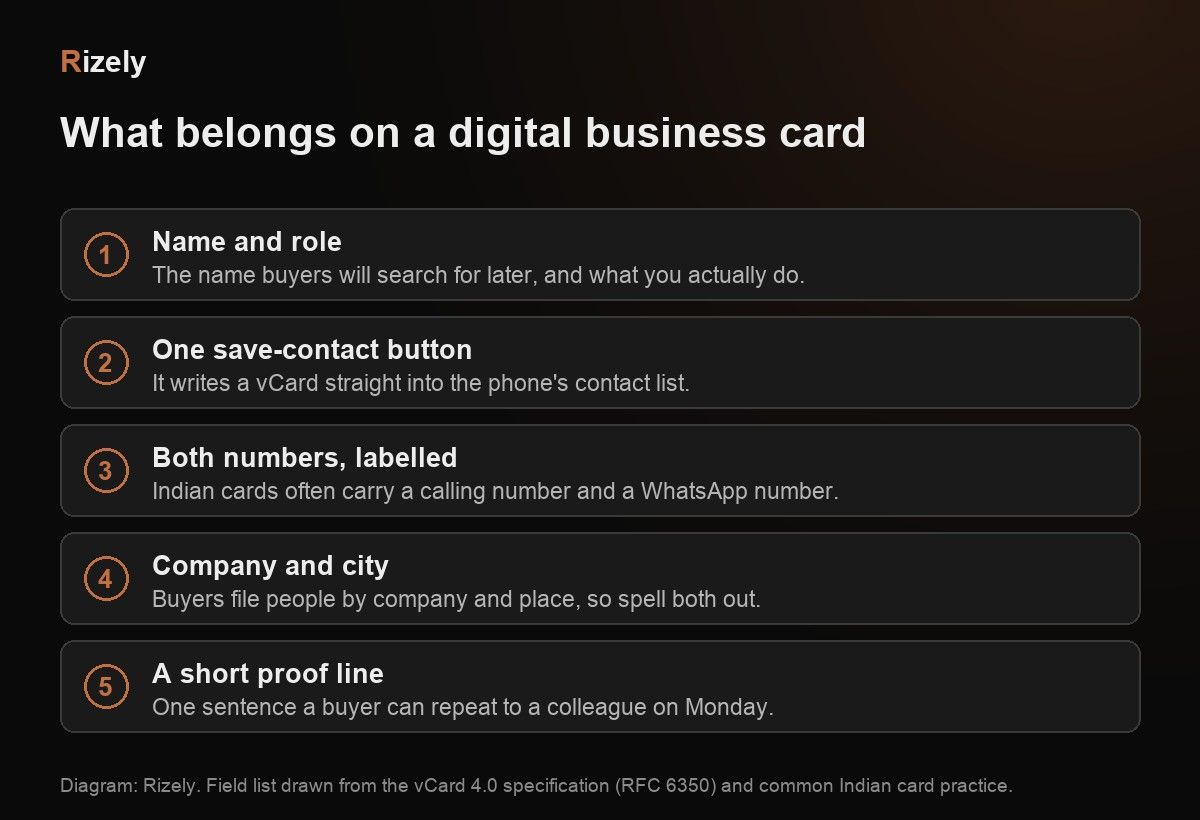
Nine fields cover almost every real use. Anything beyond them competes for attention with the save button.
| Field | Why it earns its place |
|---|---|
| Full name and designation | The name a buyer will search for in six months |
| Save contact button | Writes a vCard straight into the phone's contact list |
| Calling number, labelled | Indian cards routinely carry two numbers for different purposes |
| WhatsApp number, labelled | Most B2B follow-up in India happens here |
| Work email | Still the channel for quotations and purchase orders |
| Company name and legal entity | A GST invoice carries the legal name, so buyers search for both |
| City | Buyers file people by place as much as by company |
| One proof line | A sentence a buyer can repeat to a colleague on Monday |
| Catalogue or website link | One destination, placed after the save button |
The save-contact button matters more than the rest put together. It writes a vCard, the contact format defined in RFC 6350, which every phone contact app understands. A page without one asks the buyer to retype your details, and at a show nobody does that.
How to choose one in India
Six questions separate a usable product from a pretty page:
- Does it work with no app on the receiver's phone? Tap and QR should both land on a plain web page. If the buyer has to install something, you have lost the room.
- Can you label two numbers? A page that allows a single phone field will force you to drop your calling number or your WhatsApp number.
- Does it export? Ask whether the leads collected through the page come out as CSV or vCard on demand.
- Who controls the link? A link on the seller's domain belongs to the seller. Ask whether it can be redirected later.
- What happens if you stop paying? Get the answer in writing. We cover the whole question in NFC business card without a subscription.
- How fast does it load on 4G in a hall? Open it on mobile data in a basement rather than on office Wi-Fi.
Test it before you order for the team
Order a sample card for one person before you order fifty. Then run the same four checks you would run on any batch: tap it on an iPhone, tap it on an Android phone, scan the QR with a regular camera, and confirm the link opens the correct profile rather than a template.
Watch the save step in particular. Press the save-contact button and look at what lands in the phone's contact list. If the company field is empty, or both numbers merge into one line, the page will quietly break your buyers' CRM imports for as long as the cards are in circulation.
The mistake that costs the most
Two numbers on one card is the Indian detail that imported products handle worst. A buyer saves you, calls the number that turns out to be a landline extension, gets nowhere, and moves on. Label the fields plainly: "Call" and "WhatsApp". It takes ten seconds to set up and it changes whether you are reachable on the day somebody has a requirement.
The second most expensive mistake is the entity name. Your brand is what people remember and your legal name is what appears on the purchase order. Put both on the page, in that order, and the procurement team that receives your quotation can match them without a phone call.
What a digital card leaves unsolved
A digital card shares your details outward. The visiting cards that other people hand you at the same show still arrive as paper, in several scripts, and they still need to be read, filed and followed up. That pile is the half of the handshake that decides your pipeline, and it is covered in how to scan visiting cards on WhatsApp.
Rizely makes NFC business cards with a digital profile that is free forever*, and runs an AI agent on WhatsApp and Telegram that reads the visiting cards you collect and drafts follow-ups for you to approve.
*We commit to keeping your Rizely digital profile free for at least 10 years. Want to see a sample profile? Write to [email protected] and we will share access to your email ID.
Shop NFC cards, read the wider buying guide at choosing an NFC business card in India, or browse more Rizely guides.
Frequently asked
What is a digital business card?
A web page holding your contact details, opened by tapping an NFC card or scanning a QR code. The receiver needs no app because the page is ordinary web.
What should a digital business card include in India?
Name and designation, a save-contact button, a labelled calling number and a labelled WhatsApp number, work email, company and legal entity name, city, one proof line and one link.
Why label two numbers on an Indian business card?
Indian cards routinely carry a calling number and a separate WhatsApp number. A page with a single phone field forces you to drop one of them.
What is a save-contact button?
A button that writes a vCard, the contact format defined in RFC 6350, straight into the phone's contact list so the buyer never retypes your details.
How do I test a digital business card before ordering for a team?
Order one sample, tap it on an iPhone and an Android phone, scan the QR with a regular camera, and check what actually lands in the phone's contact list.
Who controls the link on a digital business card?
Whoever owns the domain in the address. Ask the seller whether the link can be redirected later, and get the answer in writing before you order.
Keep reading
 NFC Cards
NFC business card without a subscription: what you pay for
An NFC business card has three parts and a recurring plan usually covers one of them. What to ask a seller before you order cards for a team.
5 min read Cards Agent
Scan visiting cards on WhatsApp: what to do with the cards you collect
Send a card photo in a chat, get the contact back as fields, attach a voice note with the booth context, and approve the follow-up before it is sent.
5 min read