How do NFC business cards work? Tap, link, profile, and the QR backup
A phone powers the chip in an NFC card, reads one link and opens your profile. Here is what iPhone and Android users see, and why the QR code still matters.
An NFC business card works by letting a phone power a tiny chip sealed inside the plastic. The phone's NFC reader makes a short-range radio field, the chip wakes and returns one web link, and the phone opens that link in the browser. Your details live on the page, while the card carries the pointer.
So the card carries a pointer. The page carries your details. That split is why you can change your mobile number without reprinting anything.
Key takeaways
- The chip has no battery. The phone's field powers it during the tap.
- The chip stores one link, written in the NDEF format published by the NFC Forum.
- The receiver needs no app on an iPhone XS or later, or on an Android phone with NFC switched on.
- Android 17 now shows an open-link notification that the receiver has to tap.
- The printed QR code opens the same page for any phone with a camera.
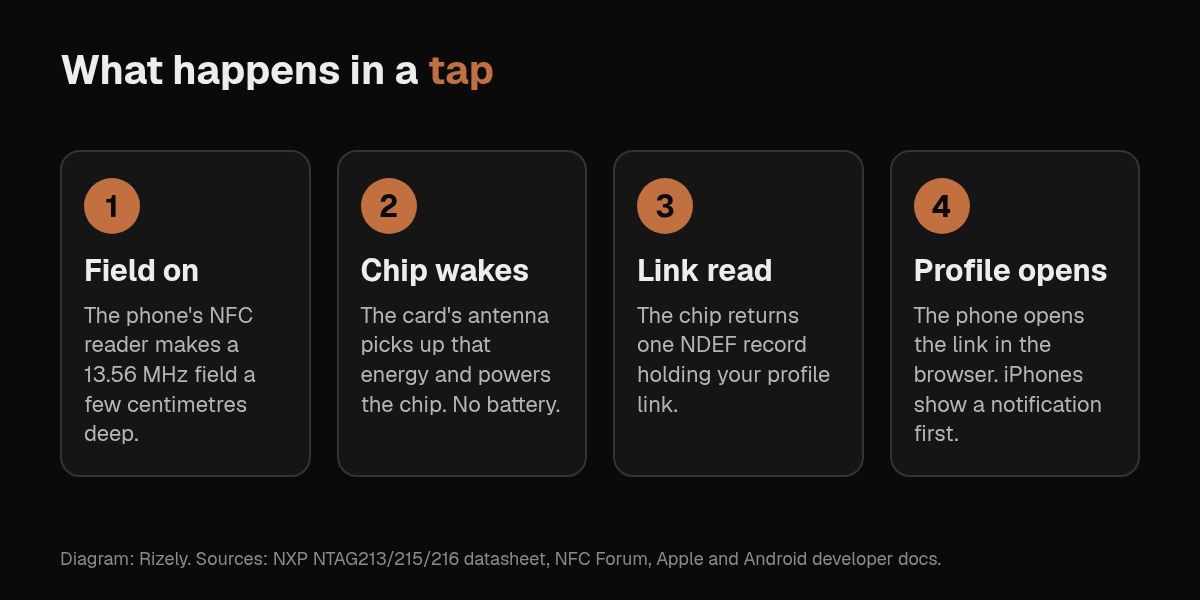
What happens during a tap
Four things happen in under a second. The phone's NFC reader makes a 13.56 MHz field a few centimetres deep. The card's antenna picks up that energy and powers the chip. The chip returns one NDEF record holding your profile link. The phone reads the link and offers to open it. Nothing is installed and nothing is paired.
NDEF is the message format defined by the NFC Forum for tags of this kind. A single NDEF message can hold several records. Both major phone platforms look at the record at the start of the message and use that one to decide what the tag means, which is why a well-written card keeps the profile link in that position.
What the receiver sees on an iPhone
Apple's Core NFC documentation states that iPhone XS and later support background tag reading. The system scans for tags while the phone is in use, shows a pop-up notification when it reads one, and delivers the tag data after the person taps that notification. If the phone is locked, it asks them to open it before going further.
The same Apple page is specific about multiple links: when an NDEF message contains more than one URI record, the system uses the one at the start. It also notes that if no installed app is associated with the link, the system opens it in Safari. For a business card that is the normal path, since your profile is a web page rather than an app.
Older iPhones do not read tags in the background. Those buyers use the printed QR code instead, which is why a card that carries both is worth more at an Indian stall than a card with a chip alone.
What the receiver sees on an Android phone
Android's developer documentation says devices are usually looking for NFC tags when the screen is unlocked, unless NFC is switched off in Settings. The tag dispatch system parses the tag, reads the record at the start of the message to work out what the data is, and sends the person to the matching app or browser.
One recent change matters for anyone handing out cards. From Android 16, tapping a tag that stores an http or https web link triggers a view action rather than the older tag intent. From Android 17, the same tap surfaces an open-link notification that the person has to tap before the browser opens.
In practice the buyer now takes one deliberate step. Say "tap the notification" out loud while you hand the card over, and the pause stops feeling like a failure.
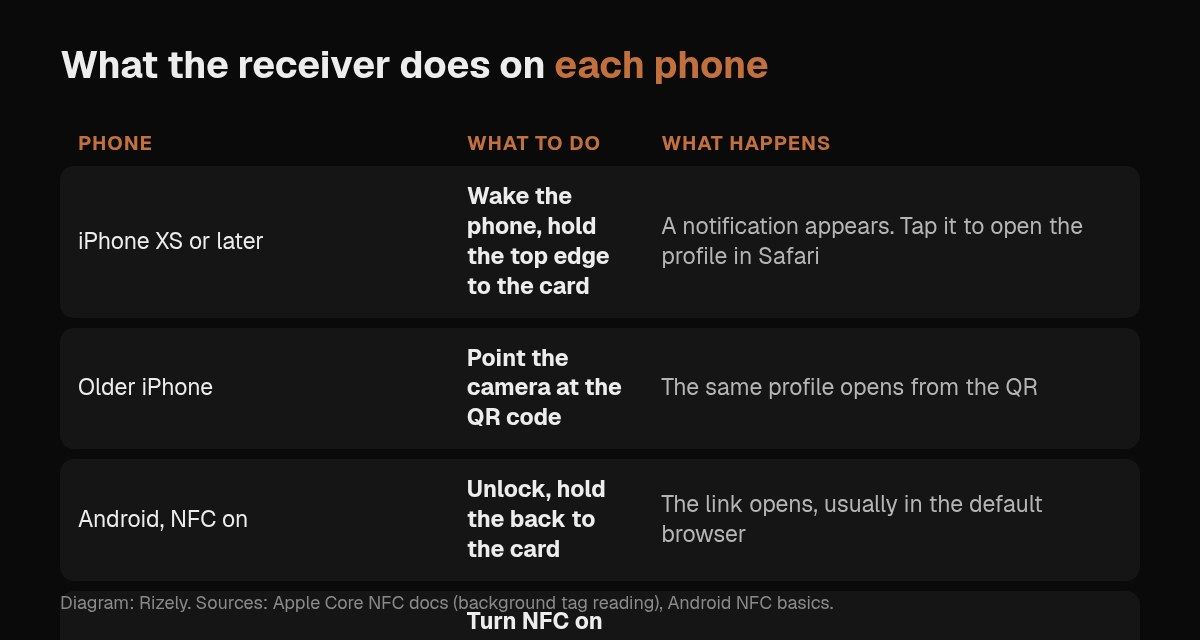
| Phone | What the receiver does | What happens |
|---|---|---|
| iPhone XS or later | Wake the phone, hold the top edge to the card | A notification appears. Tapping it opens the profile, usually in Safari |
| Older iPhone | Point the camera at the printed QR code | The same profile page opens from the QR |
| Android, NFC on | Wake the phone, hold the back to the card | An open-link notification appears on Android 17. Tapping it opens the profile |
| Android, NFC off | Turn NFC on in Settings, or scan the QR | The same profile page, either way |
Where to hold the phone
NFC antennas sit in different places on different handsets. On most iPhones the antenna is near the top edge, so hold that part of the phone against the card. On most Android phones it sits in the middle of the back panel. If a tap does not register in two seconds, move the phone an inch and try again rather than pressing harder. A thick wallet case with a metal plate can weaken the field enough to stop a read.
When the QR code takes over
The QR code is the fallback that keeps a card useful in a room full of mixed handsets. It works on older iPhones, on Android phones with NFC switched off, on a borrowed phone and on a laptop webcam. It also works when a buyer wants to scan your card from across a table rather than taking it from your hand.
Good QR layout follows the ISO/IEC 18004 standard, which calls for a clear quiet zone around the pattern. Designers who push a logo into that margin make the code slow to read under stall lighting.
If you are choosing a design, read how an NFC business card is made for what the print process can and cannot hold.
What an NFC card does not do
It shares your details outbound, in one tap. It does nothing about the 60 or 180 paper visiting cards that other people hand your team across the counter on the same day.
Those still arrive as paper, in several scripts, often with a calling number and a separate WhatsApp number on the same card. That is the other half of the handshake, and it is covered in NFC card vs paper visiting card.
Rizely makes NFC business cards with a digital profile that is free forever*, and runs an AI agent on WhatsApp and Telegram that reads the visiting cards you collect and drafts follow-ups for you to approve.
*We commit to keeping your Rizely digital profile free for at least 10 years. Want to see a sample profile? Write to [email protected] and we will share access to your email ID.
Ready to carry one? Shop NFC cards. If you are deciding what goes on the page behind the tap, see what to put on a digital business card, or browse more Rizely guides.
Frequently asked
Do NFC business cards need an app?
The person receiving your card needs no app. iPhone XS and later, and Android phones with NFC switched on, read the link and open it in the browser.
Do NFC business cards work with iPhone?
Yes. Apple's documentation says iPhone XS and later read NFC tags in the background and show a notification that opens the link. Older iPhones can scan the printed QR code instead.
Does an NFC business card need a battery?
No. The chip is passive and takes its power from the phone's NFC field during the tap.
What information is stored on an NFC business card?
Usually one web link, stored as an NDEF record. Your name, numbers and company live on the profile page that link opens.
Why does an NFC business card also have a QR code?
The QR code opens the same profile on phones that cannot tap, such as older iPhones or Android phones with NFC switched off.
What changed for NFC cards on Android 17?
Android's documentation says that from Android 16 a web-link tag triggers a view action, and from Android 17 the tap surfaces an open-link notification the person has to tap before the browser opens.
Can I update my details without a new NFC card?
Yes, if the chip links to a profile page you can edit. Change the page and every card you have handed over shows the new details.
Keep reading
 NFC Cards
NFC business card without a subscription: what you pay for
An NFC business card has three parts and a recurring plan usually covers one of them. What to ask a seller before you order cards for a team.
5 min read NFC Cards
Digital business card in India: what to put on it and how to choose one
The nine fields that belong on a digital business card, six questions to ask before you order for a team, and the Indian details most products get wrong.
5 min read